Malware analysis might sound intimidating, but as a newcomer to the field, I’ve found it to be an incredibly fun and interesting challenge. This article will provide a high-level overview of the steps I took in a lab called MalaCrypt, offered by CyberDefenders. Whether you’re a fellow beginner or just curious about the process, I hope this guide sparks the same curiosity and excitement that I felt while working through it.
https://cyberdefenders.org/blueteam-ctf-challenges/malacrypt/
Scenario
During routine monitoring at MalaCrypt company, a suspicious binary named malware.exe was found on a device. Initial checks of its hash values against threat intelligence platforms yielded no results, suggesting the attacker may have altered the malware to evade detection. As a security analyst, the next action is to investigate further, using alternative methods beyond hash-based detection, considering that attackers often modify hashes to bypass initial security checks.
Static Analysis
The first step in gathering information is using static analysis tools to take a look at the file’s characteristics and potential behavior before running it. One of the most common software used for this is Ghidra, which is a reverse engineering tool that decompiles the source code to a higher level language like C/C++ for easier parsing.
One of the many great things about Ghidra is the import summary it provides once you upload a file. It tells you many important details that can help in our investigation.
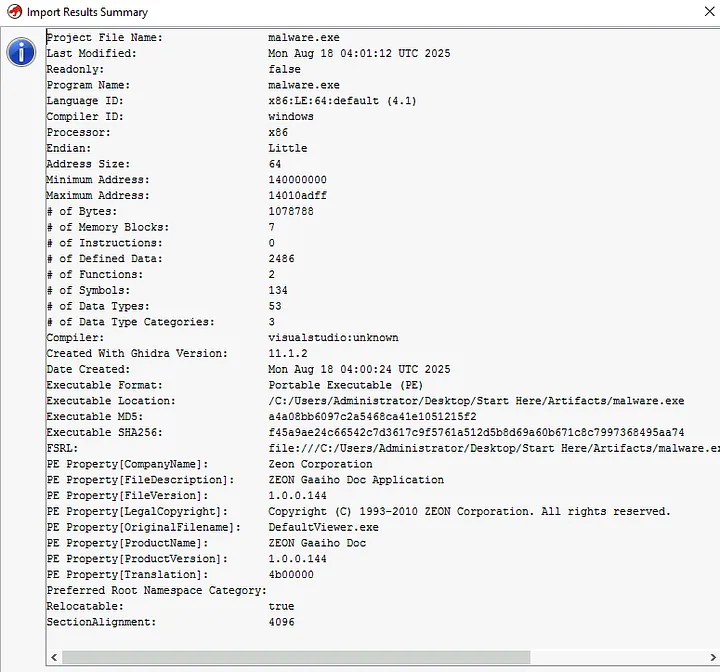
As we can see from the results above, we know a few things for certain which helps us narrow down the focus of our analysis:
- x64 binary architecture, specifically compiled for a Windows OS: This lets us know that the attackers are targeting Windows 64-bit systems and would be best to run it in a Windows 64-bit environment during the dynamic analysis.
- Original filename was DefaultViewer.exe: We already know from the scenario details, but this tells us the malware is masquerading as another program, likely trying to evade detection from threat intelligence platforms.
- MD5 and SHA256 hashes of the malware: These could be used to check threat intelligence platforms but since we already know the threat intelligence platforms yielded no results, it isn’t as useful in this situation.
From here you could also parse through the decompiled source code but that is out of my current level of understanding, so let’s take a step back and use another static analysis tool.
PeStudio extracts and presents a wide range of information about a file’s characteristics that can help point out key indicators in an investigation.
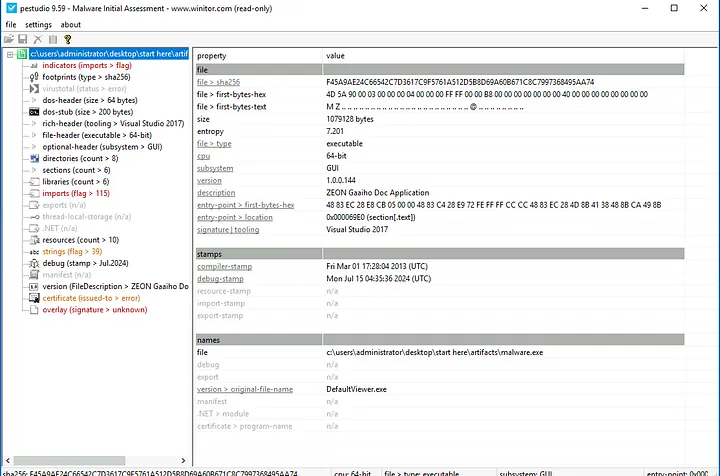
Once we have it loaded into PeStudio, we can confirm our findings from Ghidra but also expand on those by taking a look at the indicators tab.
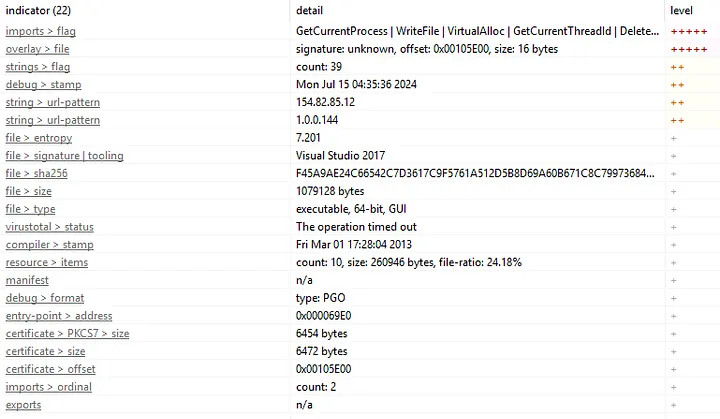
In the indicators tab, we can order them by the level of importance and find a few more key pieces of information:
- API calls that the malware makes: These can help us see what the goal of the malware is and its capabilities.
- Confirmation that the malware signature is unknown: Useful if the original scenario didn’t already tell us this.
- 2 IP addresses: Could be the attacker’s IP or a C2 server, further investigation is needed.
- Initial compilation date: Now we know when the malware was created.
Another useful tab is libraries, which lets us see what .dll files are called. Analyzing the imported libraries helps us identify a program’s capabilities and quickly flag potentially malicious or suspicious behaviors without having to dig into the assembly or decompiled code.
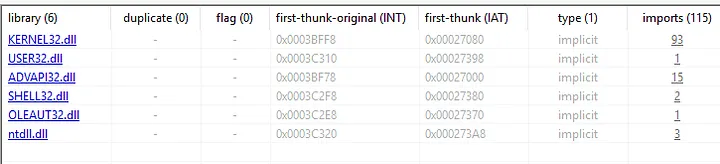
As we can see from above, there are 6 dynamic-link libraries (dll) imported. The two things that jump out to me are the number of times KERNEL32.dll is imported and the use of ADVAPI32.dll.
KERNEL32.dllis commonly used in most applications but the high number of imports could suggest many core operating system functions, such as file management, memory management, and process creation.ADVAPI32.dllhandles interactions with the Windows registry, allowing programs to read, write, and manage registry settings. This is a major red flag and could be the malware creating persistence.
If we want to see exactly what these .dlls do, we can head over to the imports tab.
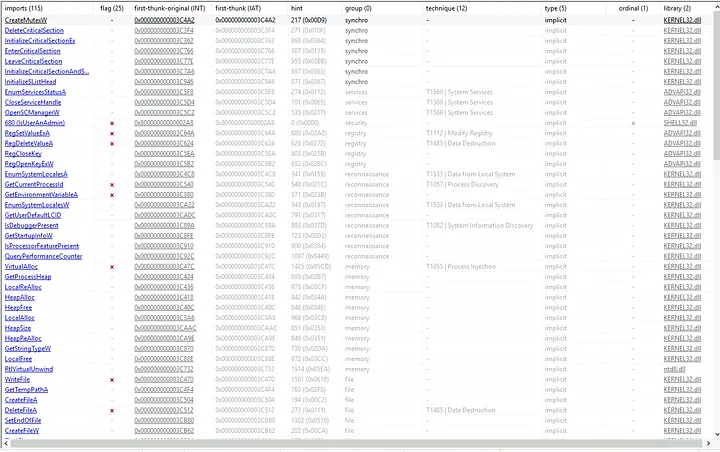
In this tab, we can see all of the API calls for each library with some more information such as their group and their assigned MITRE ATT&CK technique. The program also automatically flags which API calls it deems suspicious to help narrow down the investigation process, in this case down from 115 imports to 25 flagged for interest.
One last tool we can use to gather more information is FLOSS, which automatically extracts and deobfuscates strings from malware binaries. It is essentially a beefier version of the strings command designed specifically for malware analysis.
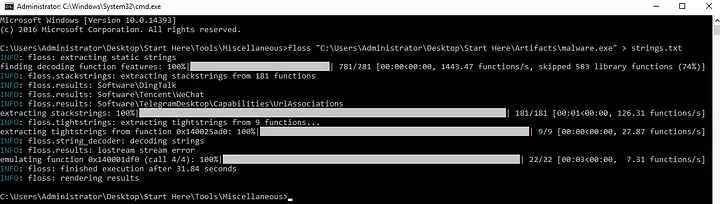
It’s much easier to parse the contents of FLOSS if you send the outputs to a text file.
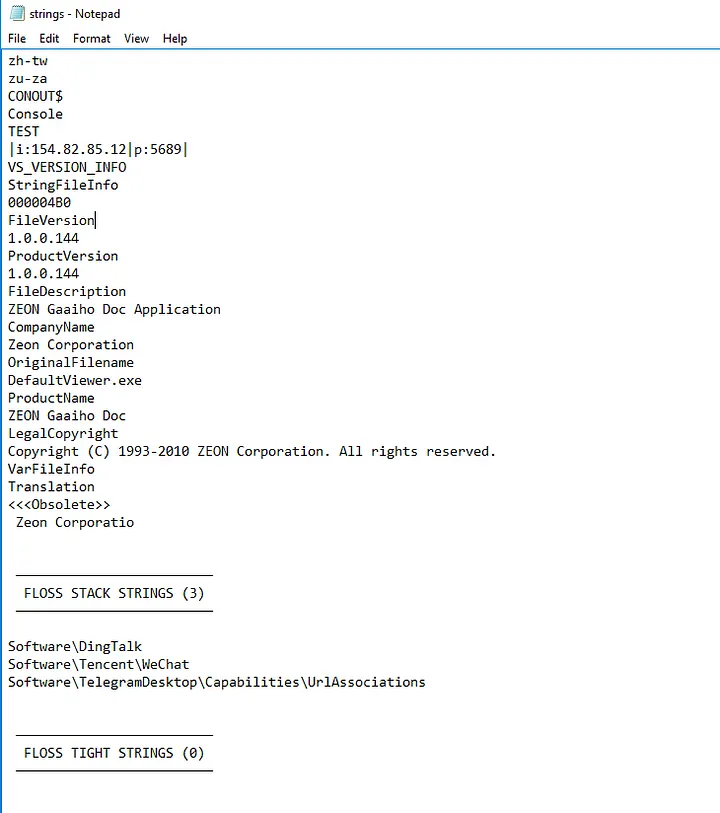
Some indicators I found at the bottom of the output were:
|i:154.82.85.12|p:5689|: This is the attacker’s IP address and port used to establish a connection with a compromised machine.- ZEON Gaaiho Doc: The product name and description is a legitimate document editing application by Zeon Corporation.
Software\DingTalk: DingTalk is one of the world’s largest professional communication and management mobile apps in China.Software\Tencent\WeChat: WeChat is a Chinese instant messaging, social media, and mobile payment app.
I’ll be circling back to these details in the Lessons Learned section soon to come.
Now that we have a good amount of information from our static analysis, let’s actually run the program and see what it does in a real environment.
Dynamic Analysis
NOTE: It is crucial to ensure the lab environment you plan to run the malware in is isolated from the internet and properly secured to prevent the malware from accidentally spreading to other hosts. Taking a snapshot of the system before executing the malware is a good idea to prevent permanent damage and allows for you to compare the baseline versus after the malware is executed.
The main tool that we need for this is Process Monitor (ProcMon), by Microsoft that logs the interactions of all running processes on the system with various resources, including processes, the file system, the registry, and the network. Before we run the malware, we want to make sure that it is in capture mode.
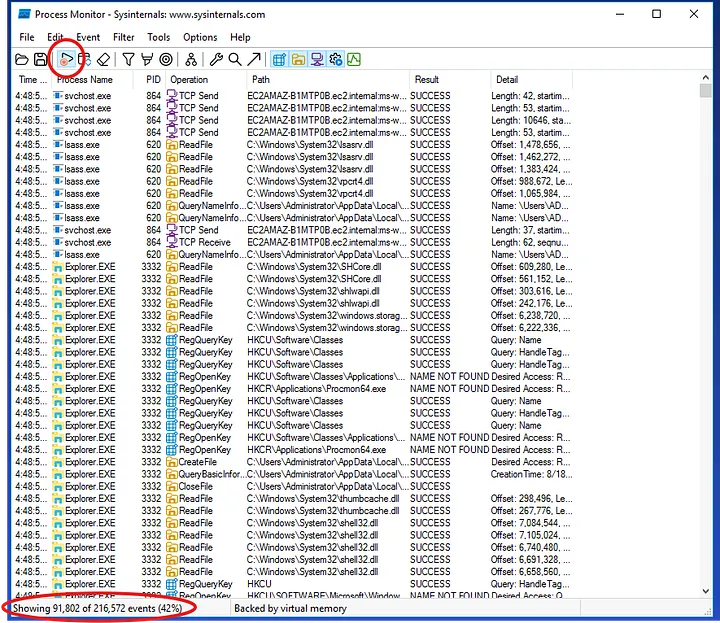
We know it’s in capture mode if the play button icon has a red recording symbol next to it and the events number in the bottom left is increasing.
Now we will execute malware.exe and take a look at what happens.
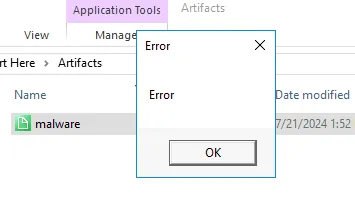
After running it, we get an error pop-up box which may initially seem harmless and trick most people. However, once we apply a filter to only show logs from the process name malware.exe, we see what really happened.
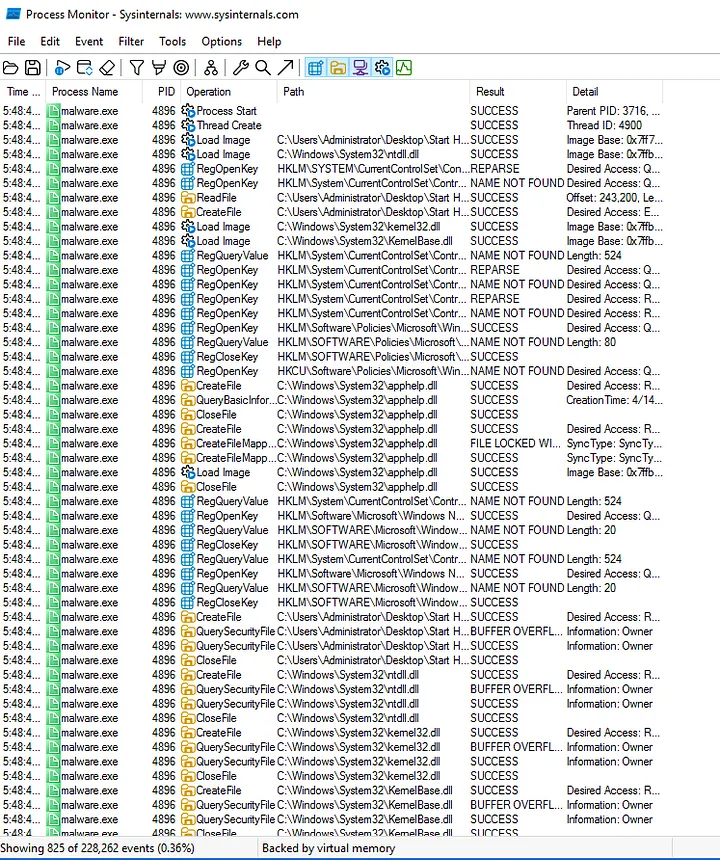
As you can see, there were over 800 events recorded in just a few seconds before I paused the capture. From here, we can see exactly what files were created or modified. We can also see which registry keys were accessed or changed, and what network connections were made. This level of detail is crucial for malware analysis as it provides concrete evidence of a program’s behavior and confirms the hypotheses we formed during static analysis.
There is a lot going on and it may seem confusing, but the best thing to do from here is begin eliminating possibilities of what the malware is.
- Ransomware: No files were copied or encrypted, typically there will be numerous
WriteFileandSetFileAttributesoperations flooding the ProcMon. - Worm: There were no spikes in network activity and no signs of
NetShareEnumorNetServerEnumoperations which are typically used in network reconnaissance for the worm to spread. - Rootkit: Stealth and evasion is a big indicator of a rootkit, without a more in-depth analysis we couldn’t rule it out but due to all noise from
RegQueryValueandQuerySecurityFileoperations, it is unlikely. - Cryptojacking: No spikes in CPU and GPU resources and no
CreateProcessoperation for creating the miner, along with no mention of a crypto wallet in the FLOSS contents.
One malware we haven’t been able to rule out yet is a trojan. As the name suggests, this malware is disguising itself as a legitimate application to trick a user into executing it. Once run, a trojan can perform a wide variety of malicious actions, such as stealing data, installing other malware, or giving an attacker remote control over the infected machine.
Thinking back to the static analysis portion, it is pretty safe to assume this is a trojan based on the file mimicking a real document viewer.
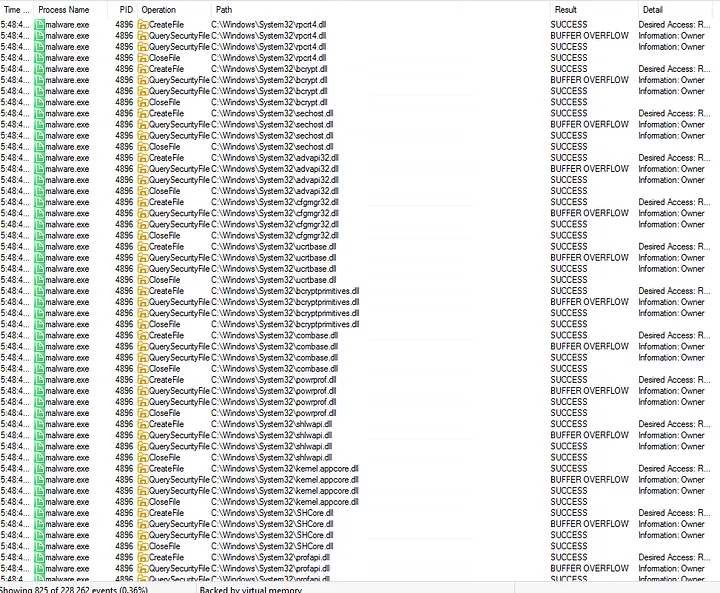
As you can see from the image above, these are just a handful of the extensive reconnaissance that the malware performed on the system’s security and cryptographic libraries. Several of these libraries like bcrypt.dll and bcryptprimitives.dll are core components of Windows’ cryptographic and security APIs. This suggests that the malware is trying to discover which security and cryptographic features are available on the system to see what is weak and worth targeting.
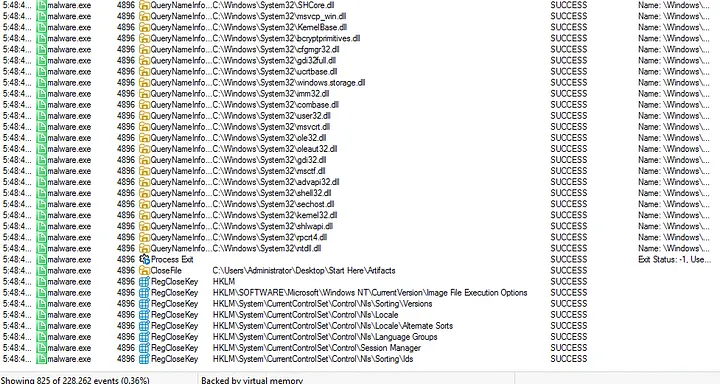
After hundreds of these queries, the malware closes itself without establishing any connections. This leaves us with a few possibilities for the end goal of the malware:
- Reconnaissance Trojan: The malware might only be used as a reconnaissance trojan designed to map out the system’s security features and vulnerabilities. Now that they have successfully enumerated the system, the attackers could use this intelligence to launch a more sophisticated attack.
- Malware Execution Failure: The malware could have failed to run properly. It may have hit an error, been blocked by a security feature, or found that the system didn’t meet its requirements, causing it to terminate.
- Missed Second-Stage Payload: It downloaded and executed a second-stage payload that I completely missed. This is my first time doing malware analysis and thankfully this is a mock scenario, so this is a solid possibility too.
Lessons Learned
Thinking back to all of the evidence I have gathered thus far, this is the conclusion I have come to.
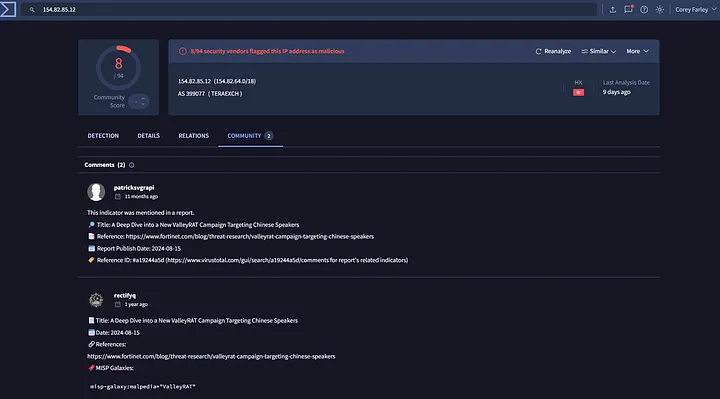
If we put the attacker’s IP into VirusTotal, we can see that several vendors have flagged the IP as malicious and there are community details about a “ValleyRAT Campaign Targeting Chinese Speakers” from 2024.
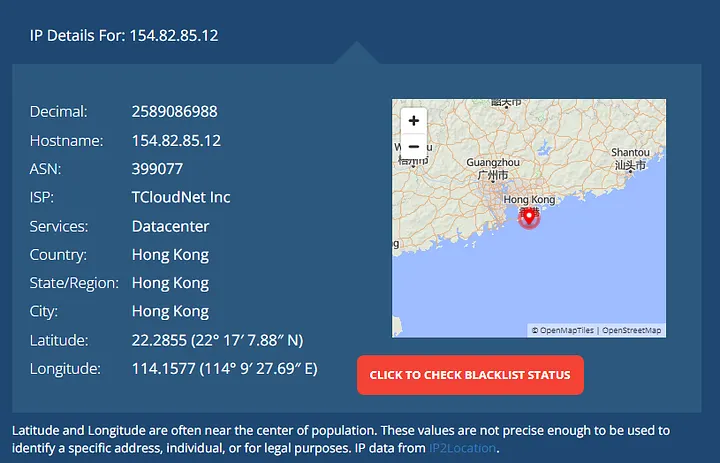
After geolocating the IP address, we can confirm that the attackers are communicating with a host in China. We also found mentions of DingTalk and WeChat, both software primarily used in China. The malware was masquerading as ZEON Gaaiho Doc, a Chinese file viewer created by the Zeon Corporation.
Combining all of these findings, malware.exe is a masquerade of DefaultViewer.exe which was a trojan that targeted Windows 64-bit systems in China. I’m still not 100% what the main goal of the trojan was, but from my findings I assume it was for gathering reconnaissance for more sophisticated attacks.
With the initial version masquerading as a real document viewer, I can only assume these attackers were targeting big organizations attempting to gather information about their systems. Rather than launching an attack straight away, the benefits to them only using the trojan as a reconnaissance tool would be that they could tailor a more effective and sophisticated attack based on the specific information they gathered.
It’s likely that the attackers were hoping a naive employee, upon seeing the error box, would simply assume the file was corrupted and delete it. This is a common tactic to avoid raising suspicion. The short execution time of 1.1 seconds suggests that the trojan’s sole purpose was to quickly perform its reconnaissance, gather the necessary information about the system, and then exit discreetly.
Conclusion
Throughout the process of dissecting this malware, I learned a lot about the specific API calls and operations that go on behind the scenes and what to look out for during malware analysis.
This has really piqued my interest for the time being, and I plan to dissect more malware sometime in the future.
I probably got some things wrong in here, but I’m here to learn so if anyone wants to correct me in the comments I would greatly appreciate it. Thanks for reading!